
100 ChatGPT Image Prompts: Best AI Photo Prompt Keywords (Copy-Paste)
Most people type a long, confused paragraph into ChatGPT and then wonder why the image looks ordinary. Here is the shortcut the top creators use: describe what you want in one short line, and then add one or two small style keywords that tell the AI how the picture should look — its camera angle, light, mood and finish.
These keywords look like /cinematic:, /goldenhour: or /closeup:. One honest note before you start: these are community style keywords, not official ChatGPT commands. ChatGPT simply understands them as clear creative directions — and that is exactly why they work so well.
Below are 100 ChatGPT image prompt keywords, sorted into 10 groups. Every keyword has a copy button — tap 📋, paste it after your subject line in ChatGPT, and generate. No need to type anything.
How to Use These Keywords (4 Simple Steps)
- Open ChatGPT and start a new chat (attach your own photo first if you want to edit it)
- Write one short line describing your subject — for example, “a red sports car on a mountain road”
- Copy 2–3 keywords from the tables below and paste them after your line
- Generate. If one thing looks wrong, say only that one change — “make the light warmer” — instead of starting again
The simple formula: Subject + Camera keyword + Light/Mood keyword = a picture that looks planned, not random.
1. Image Quality & Camera Angles
Start here when your picture looks dull or flat. These keywords decide how sharp the image is and where the camera “stands”.
| Keyword — tap 📋 to copy | What it does | Best for |
|---|---|---|
/4k: |
Asks for a sharp, high-detail finish, as if shot on a high-resolution camera. | Product shots, landscapes, posters |
/8k: |
Pushes detail to the maximum — every texture and edge stays crisp. | Large banners, detailed scenes |
/hdreal: |
A clean high-definition photographic look, without the plastic AI feel. | People, products, interiors |
/ultrarealistic: |
Maximum realism — skin, fabric and light behave like a real photograph. | Portraits, travel, product realism |
/cinematic: |
Movie-frame composition, colour and mood instead of a plain snapshot. | Posters, stories, dramatic scenes |
/droneview: |
A flying-camera view from above, like a drone shot. | Properties, beaches, cities, events |
/aerialview: |
A high view that shows the subject together with its surroundings. | Travel, real estate, landscapes |
/topdown: |
Camera directly overhead, pointing straight down. | Food, flat lays, desks, products |
/lowangle: |
Camera below the subject looking up — the subject looks bigger and stronger. | Buildings, vehicles, heroic portraits |
/highangle: |
Camera above the subject, looking down at it. | Interiors, people, storytelling scenes |
2. Close-Ups, Viewpoints & Atmosphere
Framing decides what the viewer notices first. These keywords pull the camera closer, change the viewpoint, or add air and mood to the scene.
| Keyword — tap 📋 to copy | What it does | Best for |
|---|---|---|
/closeup: |
Moves in close so the subject fills the frame and details stand out. | Faces, food, jewellery, products |
/extremecloseup: |
Extreme detail of one small area — an eye, a texture, a drop of water. | Eyes, textures, macro details |
/wideangle: |
A wider field of view that takes in more of the scene. | Rooms, landscapes, architecture |
/fisheye: |
Ultra-wide, playful distortion that bends the edges of the frame. | Action, sports, creative portraits |
/pov: |
First-person view — the viewer feels inside the scene, not watching it. | Travel, adventure, lifestyle |
/overtheshoulder: |
View from behind a person’s shoulder, into what they are seeing. | Work scenes, gaming, conversations |
/birdseyeview: |
A straight-down, map-like view from high above. | Streets, crowds, layouts, cities |
/wormseyeview: |
Ground-level view looking straight up — subjects tower over the viewer. | Skyscrapers, trees, monuments |
/fog: |
Thick fog that hides the background and adds mystery and depth. | Forests, hills, moody streets |
/mist: |
A lighter, softer version of fog — dreamy and calm. | Lakes, sunrise, mountains |
3. Weather, Time & Mood
The same place can feel peaceful, romantic or dramatic depending on the hour and the weather. Change the mood without changing the subject.
| Keyword — tap 📋 to copy | What it does | Best for |
|---|---|---|
/rain: |
Falling rain, wet surfaces and shining reflections. | City nights, vehicles, fashion |
/storm: |
Dark clouds and dramatic, tense weather energy. | Nature, action, dramatic stories |
/snow: |
Snowfall and a clean winter feel. | Mountains, travel, seasonal posts |
/sunset: |
Warm evening light as the sun goes down. | Beaches, travel, portraits |
/sunrise: |
Fresh, soft early-morning light and a hopeful mood. | Nature, wellness, new beginnings |
/goldenhour: |
The warm golden glow shortly after sunrise or before sunset. | Portraits, cars, architecture, travel |
/bluehour: |
The deep-blue calm just after sunset, before full night. | Cityscapes, hotels, architecture |
/moonlight: |
Night lit softly by the moon — quiet and silvery. | Fantasy, landscapes, night scenes |
/neonlights: |
Bright coloured neon glow — pinks, blues and purples. | Nightlife, gaming, city, tech |
/cyberpunk: |
A futuristic, gritty high-tech city aesthetic. | AI, gaming, tech posters |
4. Lighting & Photo Effects
Light is the difference between a flat picture and a striking one. These keywords control where the light comes from and how it behaves.
| Keyword — tap 📋 to copy | What it does | Best for |
|---|---|---|
/softlighting: |
Diffused, gentle light with soft shadows — flattering and calm. | Portraits, beauty, lifestyle, products |
/dramaticlighting: |
Strong contrast of light and shadow for a bold, intense look. | Cinematic portraits, ads, tech |
/rimlight: |
A bright edge of light outlining the subject against a darker background. | Portraits, products, sports |
/backlight: |
Main light behind the subject — glowing edges and silhouettes. | Sunsets, portraits, nature |
/volumetriclight: |
Visible beams of light cutting through air, dust or fog. | Forests, temples, futuristic interiors |
/godrays: |
Sun rays streaming visibly through clouds, trees or windows. | Nature, architecture, spiritual scenes |
/studio: |
A controlled studio setup — clean background, professional lighting. | Products, portraits, brand photos |
/filmgrain: |
A fine film-like grain that makes digital images feel classic. | Retro, editorial, cinematic portraits |
/anamorphic: |
A wide cinema-lens look with a filmic frame and stretched highlights. | Movie posters, cars, wide scenes |
/bokeh: |
A softly blurred background with round light orbs — the subject stays sharp. | Portraits, food, products, flowers |
5. Scenes & Environments
These keywords set the world your subject lives in — pick the environment first, then add light and camera keywords on top.
| Keyword — tap 📋 to copy | What it does | Best for |
|---|---|---|
/aerial: |
An elevated composition that shows scale and layout. | Real estate, travel, cities |
/macro: |
Tiny subjects made large, with fine textures clearly visible. | Insects, flowers, food, jewellery |
/architectural: |
Focus on buildings, lines, structure and design. | Buildings, interiors, real estate |
/industrial: |
Factories, machines and a raw metal-and-concrete mood. | Manufacturing, engineering, B2B |
/nature: |
Green, outdoor, natural settings take centre stage. | Travel, environment, landscapes |
/urban: |
City life — streets, crowds, buildings and movement. | Fashion, lifestyle, transport |
/interior: |
Indoor spaces styled and lit like a design magazine. | Homes, hotels, offices, real estate |
/tech: |
A futuristic technology mood — screens, circuits, digital glow. | AI, gadgets, software, startups |
/lifestyle: |
Polished everyday-life photography with a premium feel. | Fashion, food, travel, wellness |
/underwater: |
Below the water surface — blue tones, bubbles and rays of light. | Marine life, fantasy, adventure |
6. Art & Illustration Styles
When you do not want a photo at all, but a drawing, painting or cartoon — these keywords change the entire art style.
| Keyword — tap 📋 to copy | What it does | Best for |
|---|---|---|
/anime: |
Japanese anime style — clean lines, expressive eyes, bright colours. | Characters, avatars, fan art |
/3drender: |
A smooth 3D-modelled look, like a modern animated film frame. | Characters, products, icons |
/pixarstyle: |
A soft, cute 3D cartoon style with big expressions. | Kids’ content, avatars, family posts |
/watercolor: |
A painted watercolour look with soft, bleeding colours. | Greeting cards, art posts, portraits |
/oilpainting: |
A classic oil-paint texture with visible brush strokes. | Portraits, landscapes, wall art |
/pencilsketch: |
A hand-drawn pencil drawing with shading and paper texture. | Portraits, art, logo drafts |
/comicstyle: |
Bold comic-book inking, halftone dots and punchy colours. | Posters, stories, youth content |
/pixelart: |
Retro pixel-art style, like classic video games. | Gaming, avatars, stickers |
/vaporwave: |
A retro-future pastel aesthetic — pink skies, grids and chrome. | Music posts, posters, retro content |
/minimalist: |
Very few elements, lots of empty space, one clear idea. | Logos, posters, brand graphics |
7. Portraits & People
Made a photo of yourself or someone else? These are the portrait keywords that turn plain pictures into profile-worthy ones.
| Keyword — tap 📋 to copy | What it does | Best for |
|---|---|---|
/portrait: |
A classic head-and-shoulders portrait with the face as the hero. | DPs, profiles, portfolios |
/headshot: |
A tight professional headshot, office-ready. | LinkedIn, resumes, company pages |
/candid: |
A natural, unposed moment — as if the camera was not noticed. | Lifestyle, travel, family |
/fashioneditorial: |
A high-fashion magazine look — bold pose, styling and attitude. | Fashion, models, brand shoots |
/streetstyle: |
Urban street-fashion photography with the city as backdrop. | Fashion, youth, Instagram |
/vintage: |
Old-photo charm — faded colours, soft contrast, nostalgia. | Throwbacks, family, retro posts |
/silhouette: |
The subject as a dark shape against a bright background. | Sunsets, travel, artistic posts |
/mirror: |
A mirror-based composition with a creative double view. | Selfies, fashion, creative portraits |
/reflection: |
The subject doubled in water, glass or polished surfaces. | Travel, architecture, portraits |
/beautyshot: |
Close beauty framing with soft, flattering skin lighting. | Makeup, skincare, portraits |
8. Nature & Places
For travel posts, wallpapers and calm, feel-good content — these keywords build the place itself.
| Keyword — tap 📋 to copy | What it does | Best for |
|---|---|---|
/forest: |
A dense green forest mood with soft light through the trees. | Nature, travel, calm content |
/waterfall: |
A flowing waterfall scene with mist and a sense of motion. | Travel, nature, wallpapers |
/starrynight: |
A sky full of stars, with the Milky Way visible. | Night, camping, astronomy |
/northernlights: |
Aurora colours dancing across a night sky. | Travel dreams, winter, wallpapers |
/autumn: |
Orange-red fall colours and falling leaves. | Seasonal, travel, cosy posts |
/rainbow: |
A rainbow after rain — fresh and hopeful. | Nature, kids, positive posts |
/desert: |
Sand dunes, heat and vast empty horizons. | Travel, adventure, minimal scenes |
/island: |
A tropical island mood — palms, turquoise water, white sand. | Travel, vacations, wallpapers |
/mountains: |
Big mountain ranges with scale and drama. | Travel, trekking, motivation |
/beach: |
A relaxed beach setting — waves, sand and open sky. | Travel, summer, lifestyle |
9. Social Media & Products
Creators and sellers, this group is yours — framings made for shops, thumbnails, covers and brand posts.
| Keyword — tap 📋 to copy | What it does | Best for |
|---|---|---|
/productshot: |
Clean commercial product framing, ready for a shop or ad. | E-commerce, ads, launches |
/flatlay: |
Objects arranged neatly and shot from directly above. | Food, fashion, desk setups |
/mockup: |
Your design placed on a realistic product or screen. | Branding, apps, merchandise |
/posterstyle: |
A bold poster layout with strong title space and drama. | Events, movies, announcements |
/thumbnailstyle: |
High-contrast, big-subject framing made to earn clicks. | YouTube thumbnails, reel covers |
/coverphoto: |
A wide banner composition with safe space for text. | Facebook/YouTube covers, pages |
/unboxing: |
Hands opening a product box — excitement and reveal. | Gadgets, reviews, shopping |
/beforeafter: |
A split comparison showing a clear transformation. | Fitness, editing, makeovers |
/brandstyle: |
A consistent, premium brand-photography treatment. | Businesses, creators, campaigns |
/foodphoto: |
Appetising food framing with steam, colour and texture. | Restaurants, recipes, delivery apps |
10. Special Effects & Finishes
The final polish. These finishing effects give an ordinary image a signature look that people remember.
| Keyword — tap 📋 to copy | What it does | Best for |
|---|---|---|
/longexposure: |
Motion turned into smooth trails — light streaks and silky water. | City nights, waterfalls, traffic |
/motionblur: |
A streaked background while the subject stays sharp — pure speed. | Vehicles, sports, action |
/doubleexposure: |
Two images blended into one — like a face filled with a landscape. | Art posters, portraits, music |
/tiltshift: |
A thin slice of sharp focus that makes real scenes look like miniatures. | Cities, crowds, creative travel |
/hdr: |
Extra detail in both shadows and highlights — punchy and rich. | Landscapes, architecture, interiors |
/monochrome: |
A black-and-white finish with strong contrast. | Portraits, street, timeless posts |
/sepia: |
A warm brown vintage tone, like an old photograph. | History, family, nostalgia |
/duotone: |
A two-colour treatment for a bold graphic look. | Posters, music, brand art |
/glitch: |
Digital glitch distortion — colour splits and scan lines. | Tech, gaming, edgy posters |
/holographic: |
An iridescent, rainbow-shifting futuristic shine. | Tech, beauty, futuristic products |
Ready-to-Use Example Prompts (Copy & Paste)
Keywords become powerful when they ride on a clear subject. Copy any of these complete prompts as they are, or swap the subject with your own idea.
Example 1 — Cinematic Travel Photo
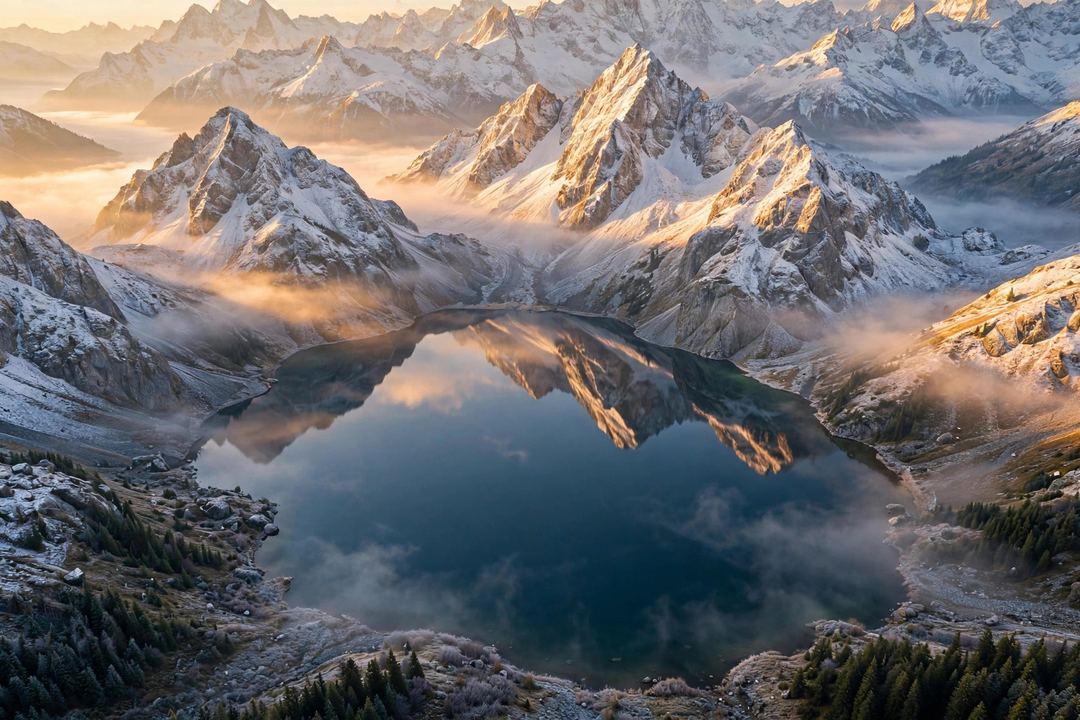
Create a beautiful mountain lake landscape with snow-covered peaks and a clear reflection in the water. /cinematic: /goldenhour: /aerialview:
Example 2 — Premium Product Photo
Create a premium product photo of wireless earbuds on a dark glossy surface with soft reflections. /studio: /closeup: /rimlight: /bokeh:
Example 3 — Professional DP From Your Own Photo
Edit my uploaded photo into a confident professional profile portrait in a modern office, keeping my face exactly the same. /headshot: /softlighting: /ultrarealistic:
Example 4 — Futuristic Tech Poster

Create a futuristic AI robot poster with glowing digital elements and empty space at the top for a headline. /tech: /neonlights: /dramaticlighting: /posterstyle:
Short Keyword or Full Prompt — Which Is Better?
Both, at different moments. A short keyword is best when you already have the picture in mind and only want to steer one thing — the angle, the light, the mood. A full prompt is better when the whole scene is new: subject, place, colours, format and purpose all matter. The working method most creators settle on is a hybrid: one clear subject line, two or three keywords, then small corrections in the same chat. That is faster than writing a perfect paragraph — and the results are usually better.
5 Mistakes to Avoid
- Using 8–10 keywords at once. The directions start fighting each other. Two or three that agree with each other beat ten that don’t.
- Mixing opposite moods.
/sunrise:with/storm:and/cyberpunk:in one prompt gives a confused picture, not a rich one. - Forgetting the format. Making a reel cover or a DP? Say “vertical 9:16” or “square 1:1” in your subject line — keywords control the look, not the size.
- Expecting the first try to be final. Treat the first image as a draft. Point at the one wrong thing and ask for only that fix.
- No clear subject. Keywords polish an idea; they cannot replace it. If the subject line is vague, the picture will be vague too.
FAQ
Do these keywords really work in ChatGPT?
Yes — as creative directions. ChatGPT reads them the same way it reads “make it cinematic” written in full English. The slash format is simply shorter to type, save and reuse.
Can I use these keywords on my own photo?
Yes. Upload your photo in ChatGPT first, then write your instruction plus the keywords — for example, “make this a festival portrait, keep my face the same” with /goldenhour: and /bokeh:. For face-safe photo prompts made specially for festivals, try our Chhath Puja Gemini photo prompts, and for a studio-style DP, see our Gemini AI profile photo guide.
Is image creation in ChatGPT free?
ChatGPT’s free plan includes image creation with limits that change from time to time, and paid plans get higher limits and priority. If you create content daily, it is also worth knowing the other free AI tools that cover image work.
Can I use the images I create commercially?
OpenAI’s terms generally allow you to use the images you generate, including for commercial work — but always read the current terms for your plan before a big campaign, and never use AI images to imitate a real person or brand deceptively.
Your turn: pick one subject you actually need this week — a DP, a thumbnail, a product photo — and run it with two keywords from the tables above. Then tell me in the comments which combination worked best for you; I will add the best reader combinations to this list. And if you found this useful, share it with one friend who is still writing full paragraphs to make a single photo.